Last Updated: November 9, 2026
Something on your computer not working? Start with one question. Is the issue a physical component or a program? Knowing hardware from software gives you a starting point. You can then recognize the parts of a computer system. And how they work together.
Quick answer: Hardware is the physical equipment in a computing device. Processor. Memory. Storage. Keyboard. Display. Software is the programs and instructions that run on it. An operating system coordinates applications and hardware. Drivers help it communicate with devices. Device-level instructions come from firmware.
The physical components of a computing system are hardware. Software supplies what those components execute: programs and instructions.
Table of Contents
What is hardware?
Hardware is the physical equipment in a computer or another device. It processes information. It also stores it, receives it, or presents it.
Some parts sit inside the device. A processor, for example. Others you connect to it, like a keyboard or printer.
IBM’s overview of computer hardware describes components by the roles they serve. Input. Output. Processing. Storage. Networking.
| Hardware role | What it does | Examples |
|---|---|---|
| Input | Sends data or commands into a device | Keyboard, mouse, microphone, camera |
| Processing | Carries out computer instructions | Central processing unit (CPU), graphics processing unit (GPU) |
| Memory | Holds information in active use | Random access memory (RAM) |
| Storage | Keeps programs and files for later use | Solid-state drive (SSD), hard disk drive (HDD), USB drive |
| Output | Presents a result | Display, printer, speakers |
| Networking | Connects a device to other devices or networks | Network adapter, router, modem |
One device can hold several of these roles at once. Take a laptop. Display. Keyboard. Processor. Memory. Storage. Network hardware too. A desktop may use a separate monitor. Its keyboard and mouse can be separate too. Only the arrangement of the hardware differs, since each component still does the same job.
Grouping hardware as internal or external works too. Inside the computer? A CPU. A memory module. An internal storage drive. A printer or external drive connects from outside.
Where a category lands can depend on the device. Take the keyboard. It’s built in on a laptop, but on a desktop it’s usually a separate peripheral.
What is software?
Software means programs plus the data they use, all of it something a device can run. The physical device or storage medium holding it is a separate thing.
Most software gets grouped by what it does:
- System software runs the computer’s resources and gives other programs the services they need. The operating system is the central example.
- Application software helps a person finish a task. Writing, browsing, editing photos, communicating, playing a game.
- Utility software handles maintenance and system tasks. Backup, file management, diagnostics.
- Programming software is for creating, inspecting, or debugging programs.
Not every source presents these groups the same way. Some list programming software on its own. Others fold utilities into system software. The labels describe what software does. They don’t describe separate physical parts of a computer.
Hardware vs. software: what is the difference?
Hardware is the physical equipment. Software is the programs and instructions a device uses. They work together, but one can’t stand in for the other. Take a keyboard, which is hardware. The operating system and application that respond to a keystroke? Software.
Below are common hardware and software components, along with what each one does.
| Example | Hardware or software? | Reason |
|---|---|---|
| Keyboard | Hardware | It is a physical input device |
| CPU | Hardware | It is a physical processing component |
| RAM | Hardware | It is physical memory used by the system |
| SSD | Hardware | It is a physical storage device |
| Operating system | Software | It manages resources and supports other programs |
| Word processor | Software | It is a program used to create and edit documents |
| Device driver | Software | It lets the operating system communicate with a device |
| Firmware | Software stored on a device | It provides low-level instructions for a component |
Putting programs on a physical device doesn’t make it software. Take an SSD. It’s still hardware. The files stored on it are data, and the programs on it are software. A screen works the same way. The screen is hardware, but the interface you see on it comes from software.
What are the main types of hardware?
What job does a piece of hardware do? Any of input, processing, memory, storage, output, or networking can be the answer. Sorting parts by function holds up. Any computer, any shape or size.
Picture writing a document. The keyboard sends your input. RAM holds the information the computer is using at that moment. The processor, meanwhile, runs the program instructions. The current page is on screen, thanks to the display. Hit save. A storage device keeps the file.
Roles overlap a little. Each part still has its own purpose. RAM is working memory. It isn’t the same as long-term storage, which is where an SSD or hard drive keeps programs and files. The processor executes instructions. Before labeling a part, pin down which role it plays: memory, storage, processing hardware, or a peripheral.
What are the main types of software?
Common software roles? System, application, utility, programming. A device can use several at once.
The operating system handles resource management, and applications lean on the services it provides. Applications give the user functions. Things like editing a document or browsing a website. Backups and system diagnostics fall under utilities. Programming tools help developers write or inspect software. Sources disagree on utilities. Some treat them as a type of system software, and others give them a category of their own.
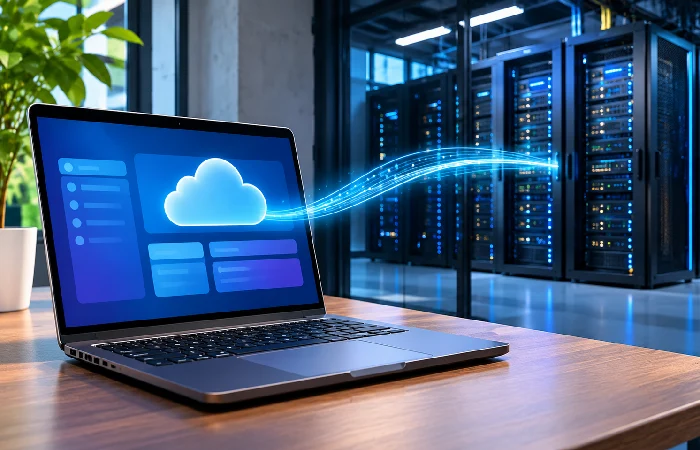
Where software runs is another way to describe it. A program installed on a computer uses that device’s hardware and operating system. Cloud software works differently. You reach it over a network, often through a browser or app, and some of the processing and storage happens on remote systems. You’re still using local hardware, a phone or a laptop.
How do hardware and software work together?
Hardware does the physical work, and software supplies the instructions and organizes tasks through the operating system. Here’s a keystroke in a word processor, and how several parts cooperate along the way:
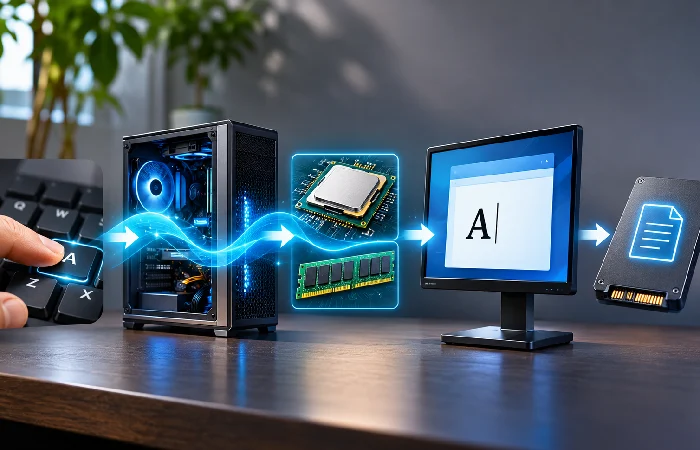
- You press a key, and the keyboard’s hardware sends an input signal.
- A driver and the operating system handle that input. They route it to the active application.
- The word processor updates the document. Meanwhile, the processor is running instructions, with memory holding whatever information the computer is using.
- Then the operating system sends display output on to the screen.
- Save the document, and the file gets written to storage by the system.
It’s a simplified view, but each role shows up clearly. The keyboard isn’t the program that interprets the key. Nor is the processor the word processor. The display? Not the document either. Different parts of the task for each.
The operating system sits as a layer between applications and hardware. Applications request services from it. It manages system resources and device communication, using device drivers to work with connected hardware.
Where do firmware and drivers fit?
Firmware and device drivers are both software. Their roles differ. Firmware means lower-level instructions stored on the device. Drivers? Different job. They give the operating system an interface for communicating with particular hardware.
A computer can use firmware during startup and to manage functions of a component. Drivers work differently. They let the operating system work with a device such as a printer or graphics card. The driver isn’t the physical device. Firmware isn’t the chip or circuit that stores it, either.
For an everyday classification, ask three questions:
- Physical component? Hardware.
- A program or a set of instructions? Software.
- Code stored in a device to support lower-level operation? Could be firmware.
Technical contexts don’t always describe that last category the same way. Check the device maker’s documentation when you’re identifying a particular component or update.
Does the distinction apply to phones and cloud apps?
Yes, a phone has both. The hardware side: processor, memory, storage, cameras, display. On top of that sits system software and application software. Devices come in different shapes, and the distinction holds anyway. Physical parts are hardware. The programs running on them are software.
A cloud app doesn’t mean hardware has disappeared. It may use remote computing resources. Your own device still has hardware and software. They connect to the service. They show its interface. Data centers sit behind the cloud, full of physical equipment. That equipment keeps it running.
Where do data and files fit?
Hardware and software aren’t the only useful categories. Data counts too, meaning information a computer stores or processes. A document, photo, or spreadsheet file is data. The physical drive holding it is hardware. And the program you open or edit it with? Software.
Some technical definitions put programs and associated data both inside the term software. Not every personal file is an application, though. It comes down to what you’re talking about. Are you thinking of the program, the information it handles, or the hardware that stores it?
How to classify common computer terms
Say you hit an unfamiliar term. Is it the physical device, the program, or the information it handles? A printer is hardware. Its driver is software. A website can mix content, text and images for example. It also carries software that provides interactive functions. Documents, images, program code, other data: a file may hold any of them, since it’s a container for stored information. What it counts as comes down to contents and context. Being a file isn’t enough on its own.
| Term | Classification | What to remember |
|---|---|---|
| Operating system | System software | Manages system resources and supports applications |
| Browser | Application software | Runs on the device’s operating system |
| Keyboard | Hardware | Sends user input |
| Printer driver | Software | Helps the operating system communicate with a printer |
| SSD | Hardware | Holds data and software |
| Firmware | Embedded software | Stored on a device for lower-level functions |
Classifying a particular update or component? Look at the device maker’s documentation. Firmware and driver mean specific implementations.
Got an unfamiliar computing term? Ask what it means first. Physical component, program, or code associated with a device. That’s the easiest way in to seeing how hardware and software fit together.